A UK tradesperson checking scheduled work beside a work van

Practical business admin for Android

Job management made simple for UK tradespeople

Keep customers, jobs, quotes, invoices, payments, expenses and appointments organised in one practical Android app—built for sole traders and small trade teams.

TradesMate app icon

Android app

Get the correct TradesMate app

1
On your Android phone

Open gettradesmate.com and tap Get the app, or use the direct button below.

2
If you search Google Play manually

Search for TradesMate and confirm the package ID shown below.

QR code opening the TradesMate Google Play listing
Viewing this on a computer?

Scan this code with your Android phone camera to open the exact Google Play listing.

Open TradesMate on Google Play

The direct button is the most reliable way to find the app. Google Play search results can vary by account, country and device.

See how it works
Built for UK trades Start on the Free plan Android app

See the real app

Your working day, organised in one place

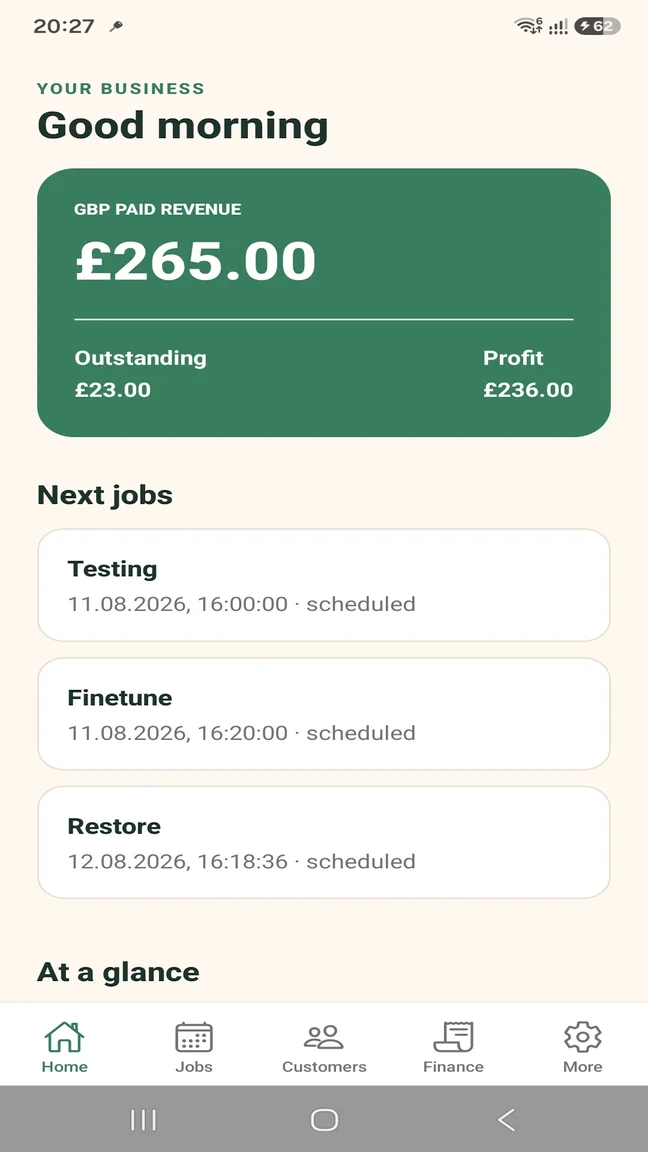
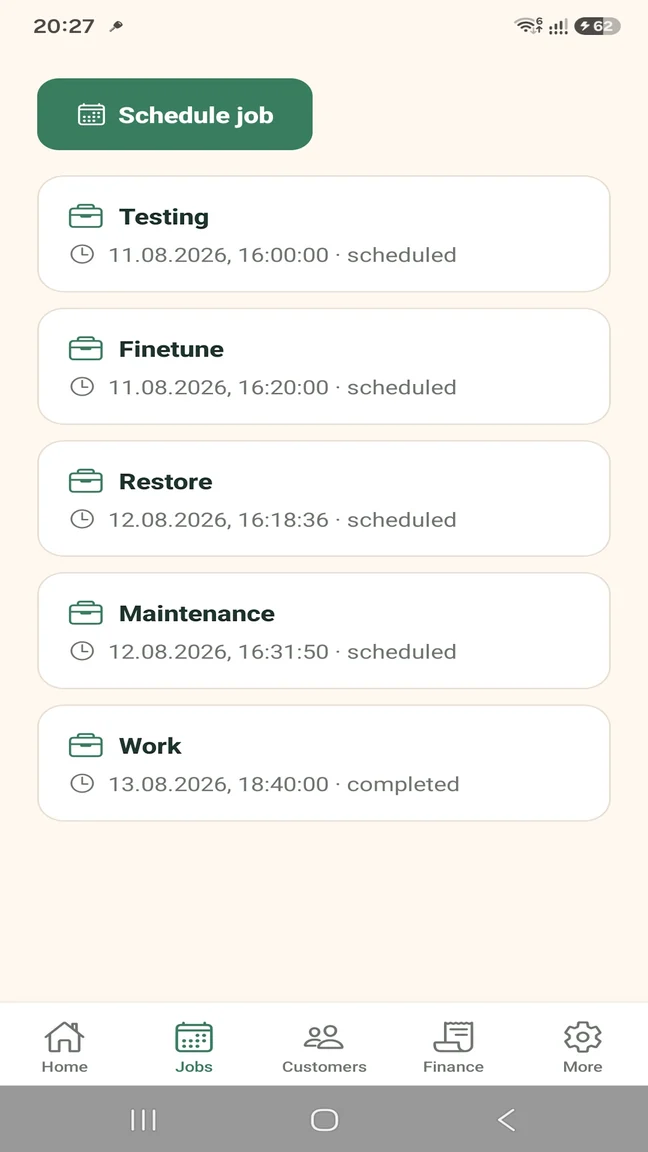
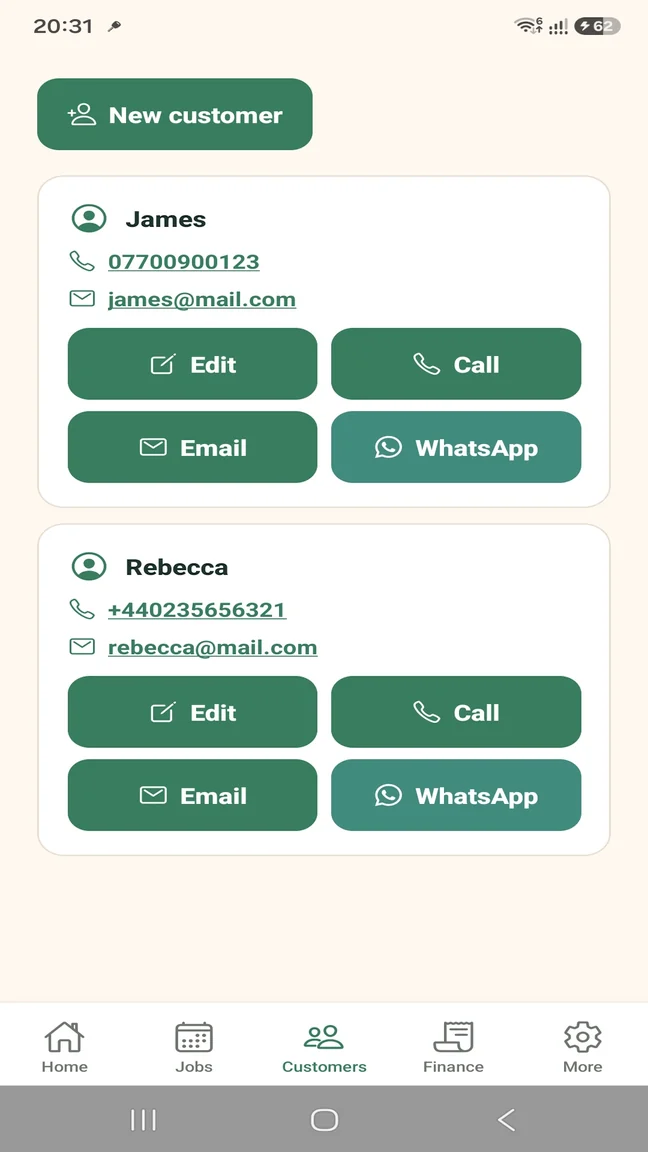
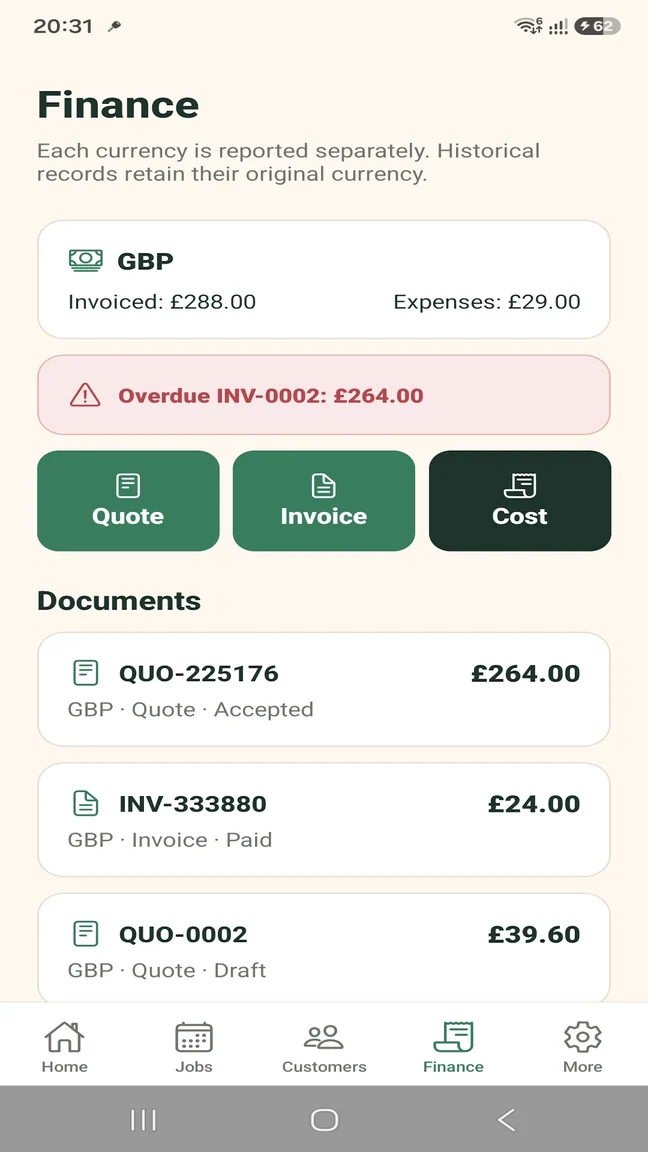
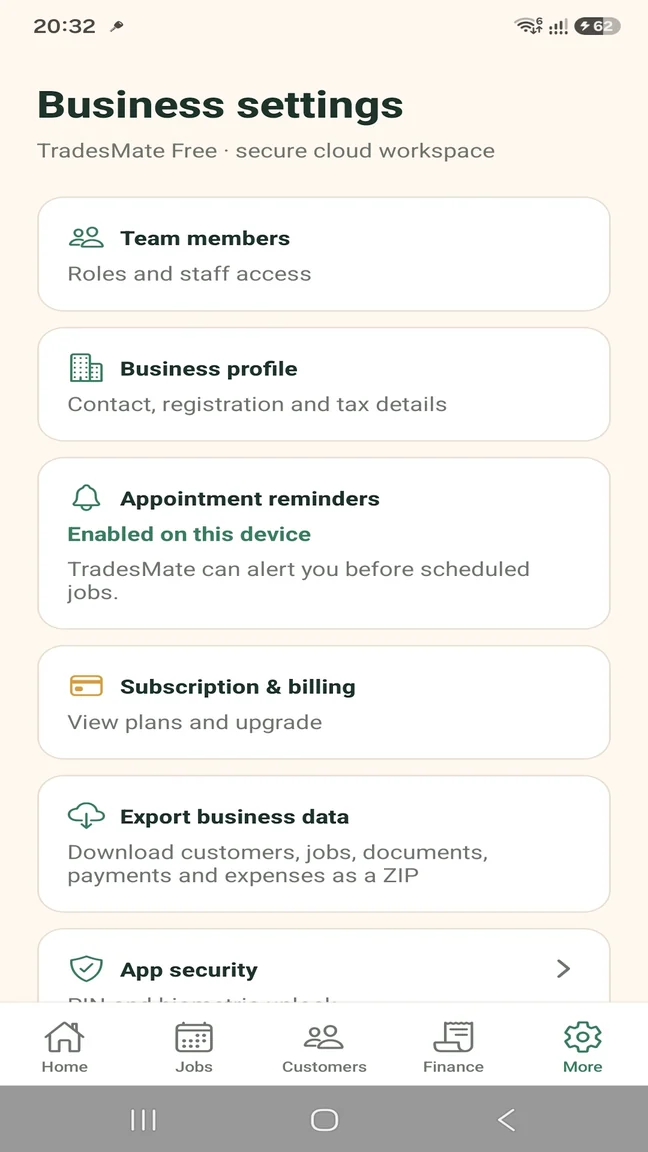
These are real TradesMate screens—not substitute mock-ups. Move from today's jobs to customer contact, documents and business figures without juggling separate tools.

TradesMate dashboard showing paid revenue, outstanding invoices, profit and upcoming jobs
Business dashboard
TradesMate job schedule with upcoming customer work and job statuses
Job scheduling
TradesMate customer records with call, email, edit and WhatsApp actions
Customer records
TradesMate finance screen showing quotes, invoices, expenses and an overdue invoice
Quotes and invoices
TradesMate business settings with team members, reminders, billing, export and app security
Business controls
TradesMate app icon

Android app

Get the correct TradesMate app

1
On your Android phone

Open gettradesmate.com and tap Get the app, or use the direct button below.

2
If you search Google Play manually

Search for TradesMate and confirm the package ID shown below.

QR code opening the TradesMate Google Play listing
Viewing this on a computer?

Scan this code with your Android phone camera to open the exact Google Play listing.

Open TradesMate on Google Play

The direct button is the most reliable way to find the app. Google Play search results can vary by account, country and device.

How it works

One clear path from enquiry to payment

Use the same customer and job details as work progresses. Less retyping, fewer loose ends.

1

Customer

Keep the details you need for every visit.

2

Quote

Build a clear multi-item quote.

3

Job

Schedule, assign and document the work.

4

Invoice

Convert accepted work into an invoice.

5

Payment

Record full or partial payments.

Features that follow the job

Useful in the van, on site and after the work

TradesMate keeps the everyday operational details together without pretending to replace your accountant.

Plan the work

Keep customer details, schedule appointments, assign team members and receive job reminders.

  • Customers and contacts
  • Job scheduling
  • Team assignment
  • Appointment reminders
Explore job scheduling

Do the work

Carry the job details with you and keep compressed before-and-after photos attached to the right job.

  • Job notes and status
  • Photo evidence
  • Call, email and WhatsApp
  • Mobile-first workflow
Explore job management

Handle the money

Create multi-item quotes, convert accepted quotes, invoice customers and track partial payments and expenses.

  • Quotes and invoices
  • PDF documents
  • Payment history
  • Expenses and profit
Explore quotes and invoices

Run the business

Give staff the right access, protect the app with PIN or biometrics and export your operational records.

  • Role permissions
  • Business profile
  • ZIP data export
  • PIN and biometrics
Explore the sole trader app

Made for independent trades

Professional admin without becoming an office person

Whether you work alone or coordinate a small team, TradesMate keeps the business side close to the actual job.

Simple plans

Start free. Upgrade when the work grows.

Pro subscriptions are handled securely through Google Play. The app shows the current price in your local currency before purchase.

TradesMate Free

Learn the complete workflow

For a sole trader getting organised.

  • Up to 5 customers
  • Up to 5 active jobs
  • Up to 5 quotes or invoices per month
  • 20 expenses per month
  • 10 job photos
  • Single-user workspace

Business data export is not included.

TradesMate Pro

Remove limits and add your team

Monthly or yearly through Google Play.

  • Unlimited customers and active jobs
  • Unlimited documents, expenses and photos
  • Team members and job assignment
  • Business data ZIP export
  • Operational and overdue reminders
  • PIN, biometric access and role controls

Monthly: 14 days free for eligible new subscribers. Yearly: no advertised trial.

TradesMate app icon

Android app

Get the correct TradesMate app

1
On your Android phone

Open gettradesmate.com and tap Get the app, or use the direct button below.

2
If you search Google Play manually

Search for TradesMate and confirm the package ID shown below.

QR code opening the TradesMate Google Play listing
Viewing this on a computer?

Scan this code with your Android phone camera to open the exact Google Play listing.

Open TradesMate on Google Play

The direct button is the most reliable way to find the app. Google Play search results can vary by account, country and device.

A practical idea from the trade world

Talk it through with Samuel

Samuel originated the idea for TradesMate and supports its growth as UK Growth Partner. If you want to see how the app fits your working day, request a free 20-minute walkthrough.

A person to discuss the fit A practical product walkthrough No payment details needed to ask

Contact TradesMate

Questions before you start?

Ask about the app, request help or arrange a walkthrough. Your request is sent securely to the TradesMate team.

We reply to the email address you provide.

We will use these details only to answer your TradesMate request.

Frequently asked questions

Useful details before you download

Clear answers about devices, plans, workflows and business records.

Who is TradesMate for?

TradesMate is for UK sole traders and small trade teams that want practical job and customer administration without a complicated office system.

Is TradesMate available on iPhone?

Not currently. TradesMate is an Android app available through Google Play.

What can I manage in TradesMate?

You can manage customers, jobs, appointments, photos, quotes, invoices, payments, expenses, team access and business settings.

Can I turn a quote into an invoice?

Yes. An accepted quote can be converted into an invoice without entering the line items again.

Does it support partial payments?

Yes. Record full or partial payments and keep the payment history with the invoice.

Can I contact customers from the app?

Yes. Customer records can open your phone, email app or WhatsApp using the saved contact details.

Can a small team use it?

Yes. Pro supports team members, role permissions and job assignment.

Which currencies are supported?

Businesses can work in GBP, EUR or USD. Historical documents retain their original currency.

How does the free plan work?

The Free plan includes limited customers, active jobs, documents, expenses and photos for a single user. You can upgrade when the business needs more.

Is there a free trial?

Eligible new subscribers can receive a 14-day trial on the monthly Pro subscription. The yearly subscription does not advertise a trial.

How are subscriptions managed?

Pro subscriptions are purchased and managed through Google Play. Current prices appear in your local currency before you subscribe.

Can I export my business data?

Pro users can download a ZIP export containing customers, jobs, documents, payments and expenses.

Available on Google Play

Put the next job—and the paperwork around it—in order.

Download TradesMate for Android and start with the Free plan.

TradesMate app icon

Android app

Get the correct TradesMate app

1
On your Android phone

Open gettradesmate.com and tap Get the app, or use the direct button below.

2
If you search Google Play manually

Search for TradesMate and confirm the package ID shown below.

QR code opening the TradesMate Google Play listing
Viewing this on a computer?

Scan this code with your Android phone camera to open the exact Google Play listing.

Open TradesMate on Google Play

The direct button is the most reliable way to find the app. Google Play search results can vary by account, country and device.