Documents and payment records from Android

Create quotes and invoices from your phone

Prepare a clear multi-item quote, convert accepted work into an invoice, share a professional PDF and record what the customer pays—all within the TradesMate job workflow.

TradesMate app icon

Android app

Get the correct TradesMate app

1
On your Android phone

Open gettradesmate.com and tap Get the app, or use the direct button below.

2
If you search Google Play manually

Search for TradesMate and confirm the package ID shown below.

QR code opening the TradesMate Google Play listing
Viewing this on a computer?

Scan this code with your Android phone camera to open the exact Google Play listing.

Open TradesMate on Google Play

The direct button is the most reliable way to find the app. Google Play search results can vary by account, country and device.

Free 20-minute walkthrough

The working-day problem

A quote should not have to be typed again when the job becomes an invoice

TradesMate keeps the customer, line items and commercial record connected. That means the accepted work can move forward while the original quote remains part of the history.

  • Describe more than one item of work
  • Keep quantities, prices, tax and notes clear
  • Generate a PDF when it is needed
  • See outstanding and overdue invoice amounts

A clear working process

From first price to final recorded payment

The document workflow follows what actually happens between agreeing the work and settling the invoice.

  1. 1

    Create the quote

    Add multiple line items with quantities, prices, tax and notes.

  2. 2

    Record acceptance

    Update the quote status when the customer accepts the work.

  3. 3

    Convert to invoice

    Carry the accepted details forward without rebuilding the document.

  4. 4

    Set and share

    Set the due date, preview the PDF, then share or email it.

  5. 5

    Record payments

    Add partial or full payments and retain the payment history.

Real TradesMate screens

Check the document before it leaves your phone

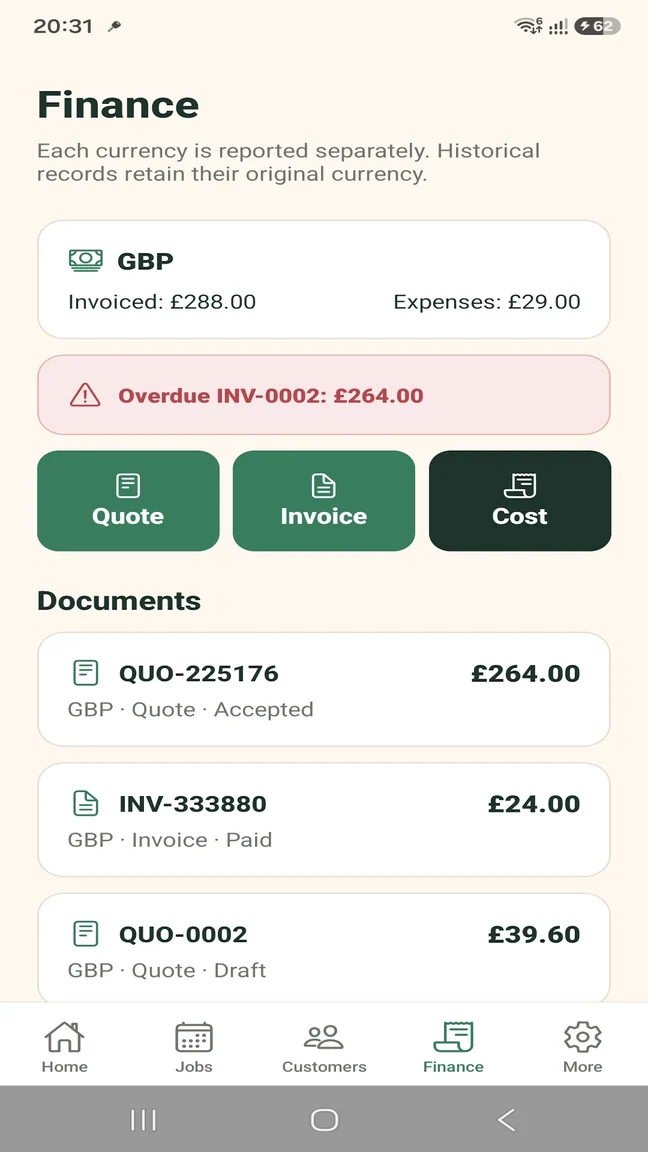
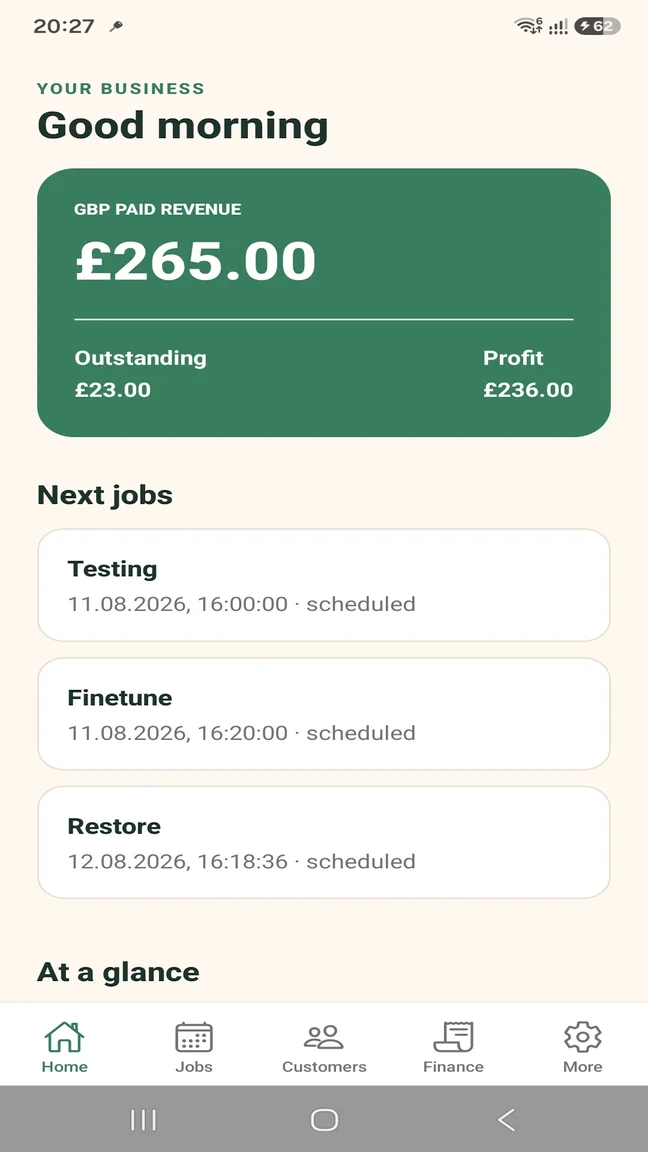
The quote view keeps customer details, line items, totals, PDF actions and document status visible. Finance then shows invoices, expenses and overdue money in context.

TradesMate multi-item trade quote with tax, total, PDF preview, sharing, email and status controls
Quote detail and PDF actions
TradesMate finance screen showing quote and invoice statuses and an overdue invoice
Quotes, invoices and overdue money
TradesMate dashboard showing paid revenue, outstanding invoice money and profit
Outstanding money in context

Build a useful quote

List the work in a way that both you and the customer can follow, including separate items rather than one unexplained total.

  • Multiple line items
  • Quantities and unit prices
  • Tax and notes
  • Draft, sent, accepted and void status handling

Move accepted work into an invoice

Convert an accepted quote into an invoice, set the due date and keep the documents associated with the same customer and work.

  • Quote-to-invoice conversion
  • Invoice due date
  • Professional PDF generation
  • Share and email actions

Record, do not process, the payment

TradesMate records how a customer paid. It does not claim to process cards or bank transfers itself.

  • Cash
  • Card
  • Bank transfer
  • Cheque or other
  • Partial and full payment history

See what remains outstanding

The finance view and dashboard give the document workflow supporting context, including overdue invoices and business expenses.

  • Outstanding invoice amount
  • Overdue indicator
  • Paid revenue
  • Expenses and profit by currency

Start without a large commitment

Free for a small workload. Pro when you need more.

The Free plan is enough to test real quotes and invoices at a small monthly volume. Pro removes the document and operational limits.

TRADESMATE FREE

Try the working process

  • Up to 5 quotes or invoices per month
  • Up to 5 customers
  • Up to 5 active jobs
  • Up to 20 expenses per month
  • Up to 10 job photos
  • Single user; no business-data export

TRADESMATE PRO

Remove the operational limits

  • Unlimited quotes, invoices and operational records
  • Unlimited customers, jobs, expenses and photos
  • Team access and job assignment
  • Business data ZIP export
  • Overdue reminders and security controls

Eligible new monthly subscribers can receive a 14-day free trial. Current subscription prices appear in Google Play in your local currency.

Questions about this workflow

Practical answers before you start

Can I turn a quote into an invoice?

Yes. Once a quote is accepted, TradesMate can convert it into an invoice without re-entering the line items.

Can I create PDF invoices?

Yes. Quote and invoice PDFs are generated when required and can be previewed, shared or emailed.

Can I record part payments?

Yes. Record each partial payment against the invoice and retain the payment history until the balance is settled.

Does TradesMate process card payments?

No. TradesMate records payment methods such as cash, card, bank transfer, cheque or other. It does not itself process card payments or bank transfers.

How can I see overdue invoices?

An invoice past its due date with money outstanding is identified as overdue in the app and included in the finance overview.

Which currencies can documents use?

TradesMate supports GBP, EUR and USD. Existing documents retain the currency in which they were created.

TradesMate for Android

Keep the work and the admin together.

Start on the Free plan or ask Samuel for a free 20-minute walkthrough.

TradesMate app icon

Android app

Get the correct TradesMate app

1
On your Android phone

Open gettradesmate.com and tap Get the app, or use the direct button below.

2
If you search Google Play manually

Search for TradesMate and confirm the package ID shown below.

QR code opening the TradesMate Google Play listing
Viewing this on a computer?

Scan this code with your Android phone camera to open the exact Google Play listing.

Open TradesMate on Google Play

The direct button is the most reliable way to find the app. Google Play search results can vary by account, country and device.

Ask for a walkthrough

We will use these details only to answer your TradesMate request.