Phone-first job management for UK trades

Job management software built for the way tradespeople work

TradesMate brings customers, jobs, quotes, invoices, payments, expenses and job photos together in one Android app for UK sole traders and small trade teams.

TradesMate app icon

Android app

Get the correct TradesMate app

1
On your Android phone

Open gettradesmate.com and tap Get the app, or use the direct button below.

2
If you search Google Play manually

Search for TradesMate and confirm the package ID shown below.

QR code opening the TradesMate Google Play listing
Viewing this on a computer?

Scan this code with your Android phone camera to open the exact Google Play listing.

Open TradesMate on Google Play

The direct button is the most reliable way to find the app. Google Play search results can vary by account, country and device.

Free 20-minute walkthrough

The working-day problem

Scattered admin makes a straightforward job harder to follow

A customer can start in your messages, the quote in a document, the appointment in a diary and the payment in your memory. TradesMate gives that work one connected record.

  • Find the customer before calling or visiting
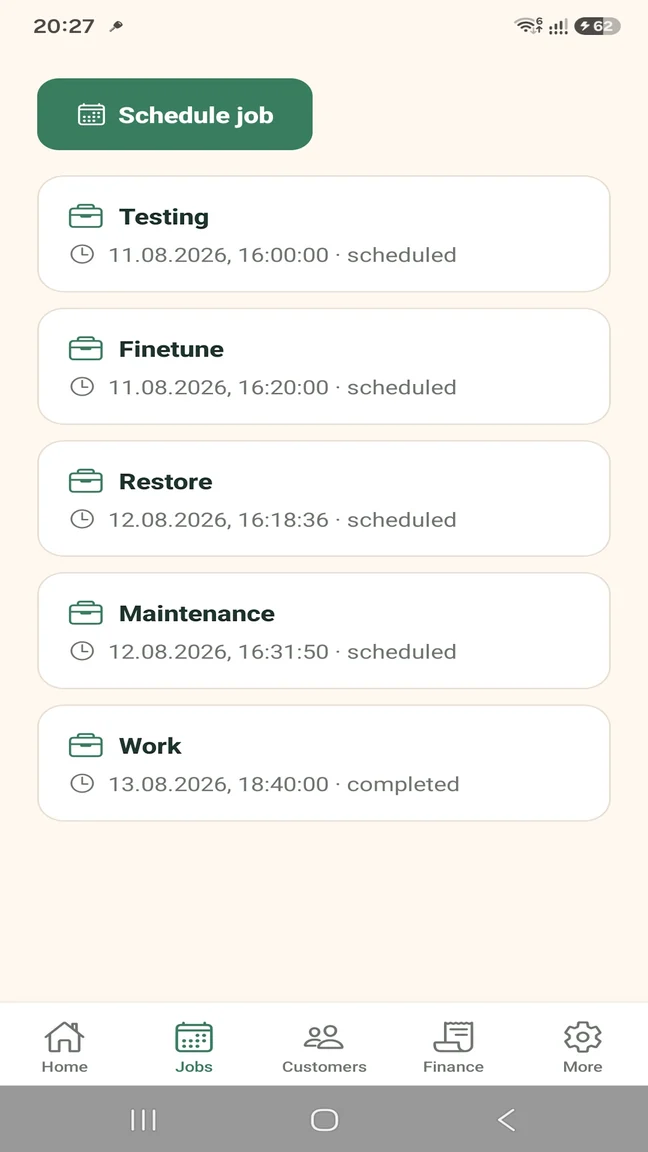
  • See what is scheduled and its current status
  • Keep the quote, invoice and payments with the work
  • Record job costs and photos without another filing system

A clear working process

The complete job lifecycle in one practical sequence

Each stage carries useful information into the next, so the job does not have to be reconstructed every time the paperwork changes.

  1. 1

    Record the enquiry

    Create the customer record and keep their phone, email and address available.

  2. 2

    Prepare the quote

    Add the work, quantities, prices, tax and notes to a multi-item quote.

  3. 3

    Schedule the job

    Set the date and time, add job details and assign a team member when needed.

  4. 4

    Complete the work

    Update the status and attach compressed before-and-after job photos.

  5. 5

    Invoice and record payment

    Convert accepted work, set the due date and record partial or full payment.

Real TradesMate screens

See the job, customer and money sides together

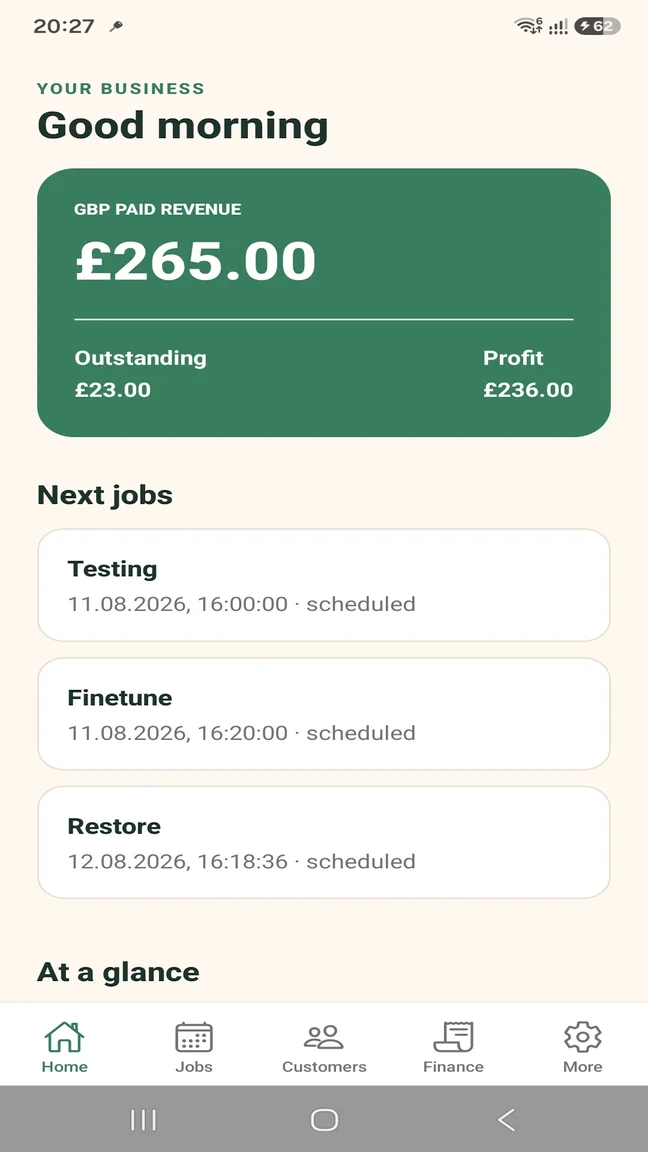
The dashboard gives the overview; focused screens keep upcoming work, customer contact and financial records easy to reach.

TradesMate job management dashboard showing upcoming jobs, paid revenue, outstanding money and profit
Business overview
TradesMate Android job list showing scheduled and completed trade jobs
Scheduled jobs
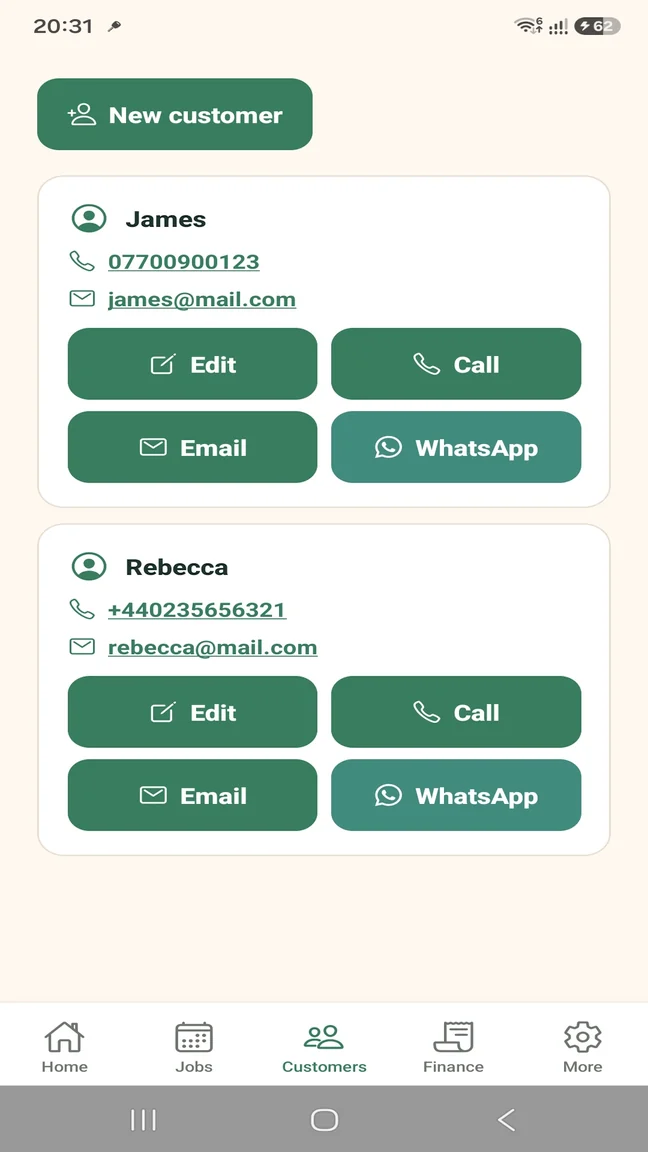
TradesMate customer records with call, email and WhatsApp actions
Customer contact
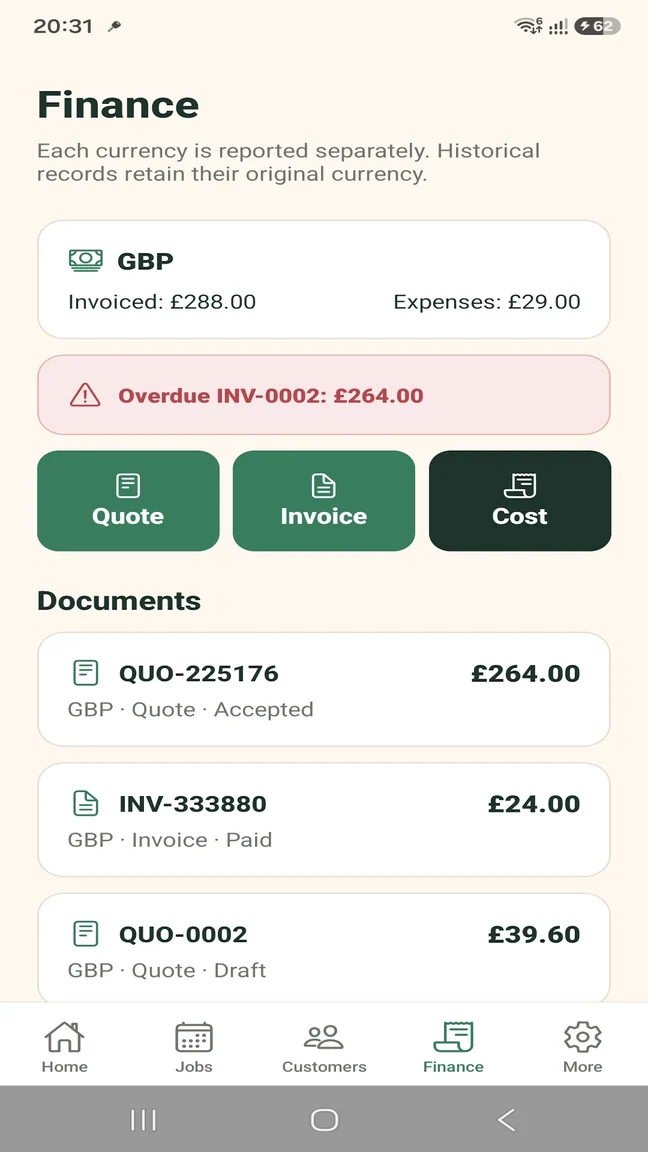
TradesMate finance screen showing quotes, invoices, expenses and overdue money
Documents and finance

Scheduling and job status

Keep the practical visit information with the job and update its progress as the work changes.

  • Dates, times and addresses
  • Scheduled, in-progress, completed and cancelled statuses
  • Configurable appointment reminders
  • Assignment for small teams

Customers, quotes and invoices

Use the saved customer details through the commercial part of the job instead of retyping them into disconnected records.

  • Phone, email and WhatsApp contact
  • Multi-item quotes
  • Accepted quote to invoice conversion
  • PDF preview, sharing and email

Payments, expenses and visibility

Record what the customer has paid and what the job or business has cost. TradesMate is operational software, not formal accounting software.

  • Partial and full payment history
  • Overdue invoice indicators
  • Expense records
  • Paid revenue, outstanding money and profit by currency

Photos and team access

Keep compressed job photos with the work and give team members access appropriate to their role on the Pro plan.

  • Before-and-after photos
  • Compressed uploads
  • Owner, admin and worker roles
  • Business data ZIP export with Pro

Built for the way you work

Useful for one trader or a small team

The same job record supports a sole trader's own working day and a small team's shared workload.

Sole trader

Keep your own customers, visits, documents and payments organised from one phone.

  • Personal job diary
  • Customer and document history
  • Free plan for a small workload

Small trade team

Add staff with role controls and assign work while keeping jobs visible to the business.

  • Team-member access
  • Job assignment
  • Role permissions with Pro

Start without a large commitment

Free for a small workload. Pro when you need more.

The Free plan covers a small real-world workload. Pro removes the operational limits and adds team access and business-data export.

TRADESMATE FREE

Try the working process

  • Up to 5 customers
  • Up to 5 active jobs
  • Up to 5 quotes or invoices per month
  • Up to 20 expenses per month
  • Up to 10 job photos
  • Single user; no business-data export

TRADESMATE PRO

Remove the operational limits

  • Unlimited customers and active jobs
  • Unlimited documents, expenses and photos
  • Team access and job assignment
  • Business data ZIP export
  • Operational reminders and security controls

Eligible new monthly subscribers can receive a 14-day free trial. Current subscription prices appear in Google Play in your local currency.

Questions about this workflow

Practical answers before you start

What is job management software for tradespeople?

It keeps the operational records around customers, appointments, work, documents, payments, expenses and photos together. TradesMate does not replace formal accounting or legal advice.

Can a sole trader use TradesMate?

Yes. The Free plan is designed to let a one-person business use the main workflow with defined limits.

Can I assign jobs to team members?

Yes, team access and job assignment are available with TradesMate Pro.

Can I keep job photos with my work?

Yes. You can attach compressed photos to a job, including useful before-and-after records.

Is TradesMate available on Android?

Yes. TradesMate is an Android app distributed through Google Play. No iPhone, desktop or web application is claimed.

Useful guides

Practical help with the admin

How to organise jobs as a sole trader

TradesMate for Android

Keep the work and the admin together.

Start on the Free plan or ask Samuel for a free 20-minute walkthrough.

TradesMate app icon

Android app

Get the correct TradesMate app

1
On your Android phone

Open gettradesmate.com and tap Get the app, or use the direct button below.

2
If you search Google Play manually

Search for TradesMate and confirm the package ID shown below.

QR code opening the TradesMate Google Play listing
Viewing this on a computer?

Scan this code with your Android phone camera to open the exact Google Play listing.

Open TradesMate on Google Play

The direct button is the most reliable way to find the app. Google Play search results can vary by account, country and device.

Ask for a walkthrough

We will use these details only to answer your TradesMate request.