One-person business, one practical app

One practical business app for busy sole traders

You do the work. You should not need five different places to organise the admin around it. TradesMate keeps the everyday records of a UK sole-trader business together on Android.

TradesMate app icon

Android app

Get the correct TradesMate app

1
On your Android phone

Open gettradesmate.com and tap Get the app, or use the direct button below.

2
If you search Google Play manually

Search for TradesMate and confirm the package ID shown below.

QR code opening the TradesMate Google Play listing
Viewing this on a computer?

Scan this code with your Android phone camera to open the exact Google Play listing.

Open TradesMate on Google Play

The direct button is the most reliable way to find the app. Google Play search results can vary by account, country and device.

Free 20-minute walkthrough

The working-day problem

The person doing the job is often doing all the admin too

When calls, appointments, quotes, invoices and costs live in separate places, an evening task becomes a search through messages and notes. TradesMate gives a sole trader one practical place to pick the work back up.

  • See upcoming work before the day starts
  • Contact customers from the saved record
  • Know which invoices still have money outstanding
  • Keep job photos and expenses attached to the business workflow

A clear working process

Move through the week without rebuilding the paperwork

TradesMate is arranged around the tasks a sole trader repeats, from adding a customer to checking what remains unpaid.

  1. 1

    Save the customer

    Keep their contact and address details ready for the next call or job.

  2. 2

    Plan the visit

    Schedule the date and time and choose when you want a reminder.

  3. 3

    Quote the work

    List the work clearly with quantities, prices, tax and notes.

  4. 4

    Invoice and record payment

    Convert accepted work and record part or full payments.

  5. 5

    Review the business

    Check outstanding money, expenses and paid revenue by currency.

Real TradesMate screens

The useful parts of the business stay close

Check the day from the dashboard, open scheduled work, review documents and adjust the business controls without leaving the app.
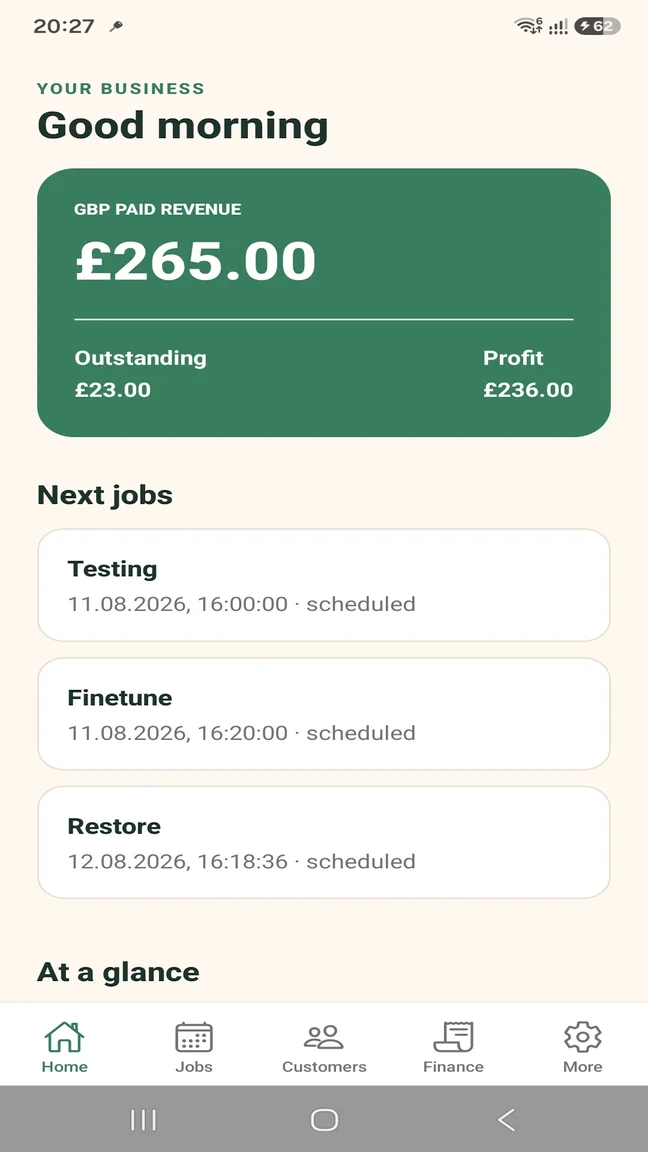
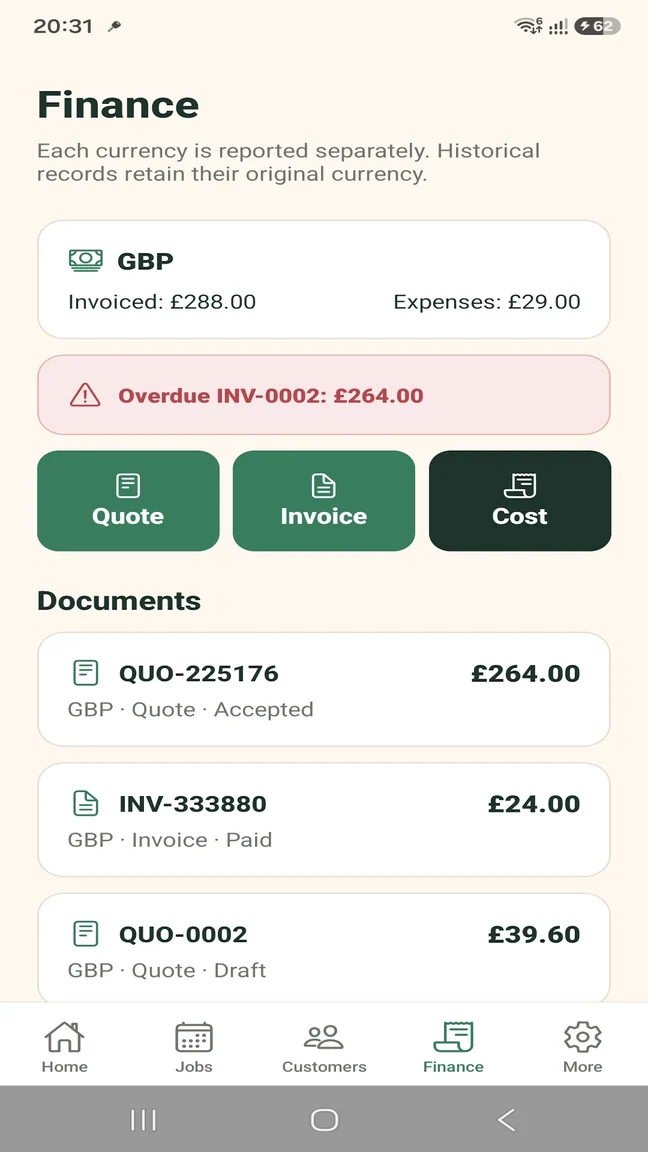
TradesMate sole trader dashboard showing upcoming jobs and business money
Start with the overview
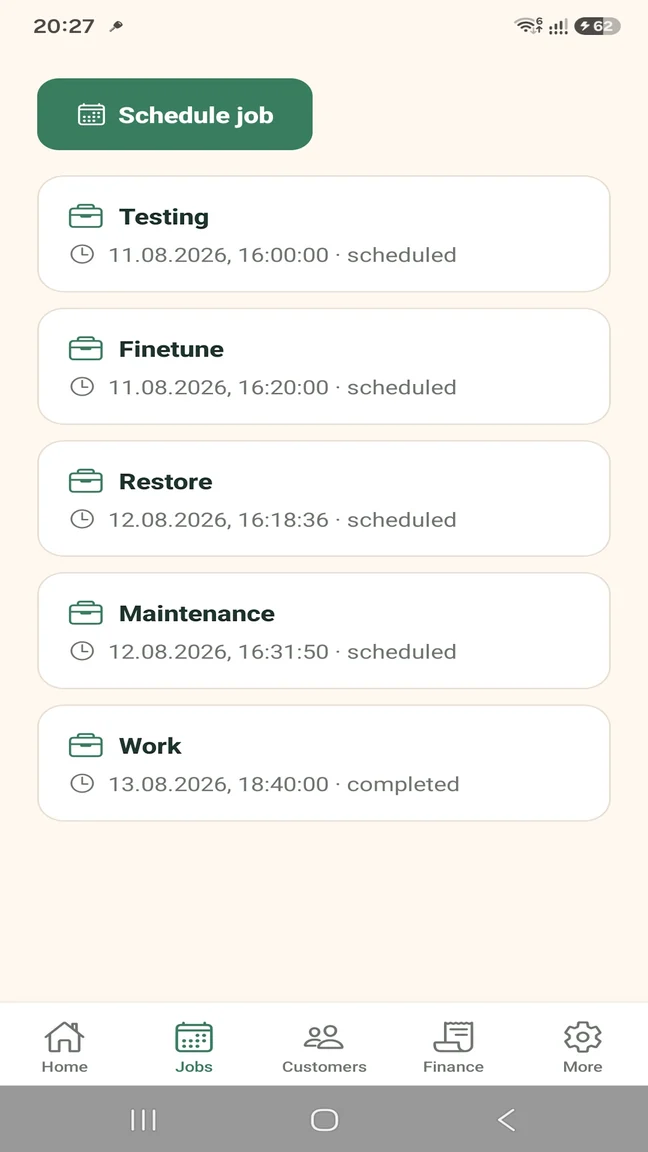
TradesMate job list for a sole trader's scheduled and completed work
Keep the diary organised
TradesMate finance screen for sole trader quotes, invoices and expenses
Review documents and money
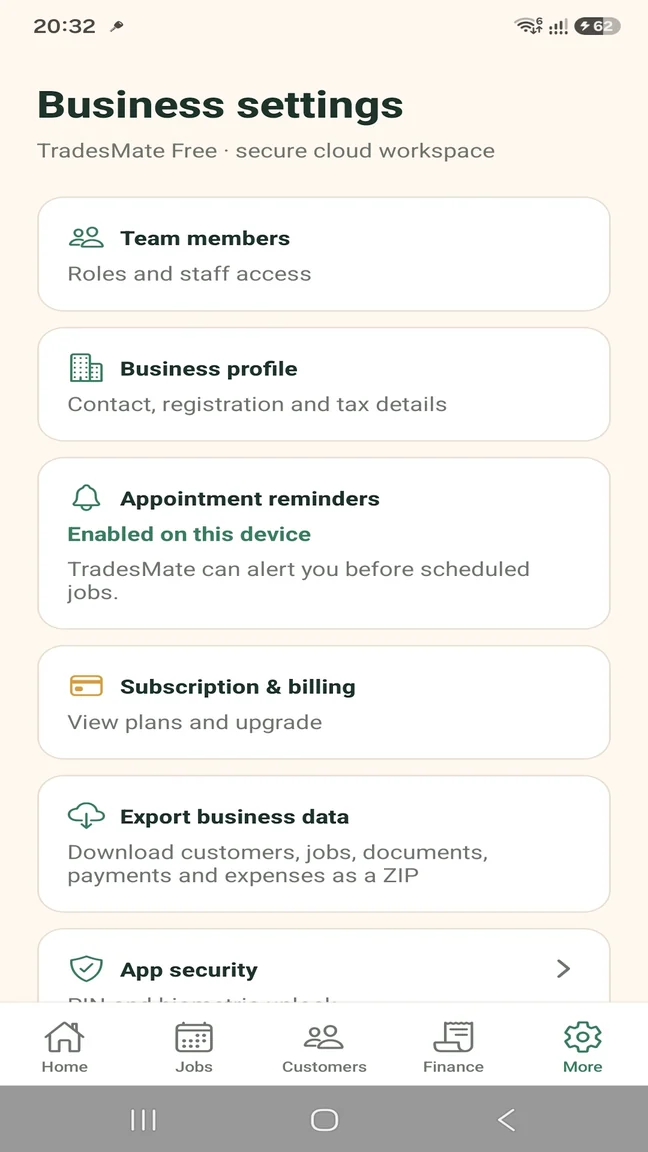
TradesMate business settings showing reminders, export, billing and security
Control the workspace

Keep the next job visible

Store dates, times, addresses and descriptions with the customer, then use configurable push reminders before scheduled work.

  • Upcoming job list
  • Customer details with the work
  • Job status updates
  • Appointment push reminders

Handle documents from your phone

Create quotes while the work is fresh in your mind and carry accepted details into the invoice.

  • Multi-item quotes
  • Quote-to-invoice conversion
  • PDF preview and sharing
  • Invoice due dates and overdue indicators

Remember what happened to the money

Record payment rather than relying on a message or memory, and keep expenses visible beside the operational picture.

  • Partial or full payments
  • Payment method and history
  • Outstanding balances
  • Expenses and paid revenue

Keep evidence and records under your control

Attach compressed before-and-after photos and, with Pro, download a ZIP export of your business data.

  • Up to 10 photos on Free
  • Unlimited photos on Pro
  • PIN or biometric app access
  • Business-data export with Pro

Start without a large commitment

Free for a small workload. Pro when you need more.

Free is a low-risk way to use the real workflow with a small customer list. Pro is for higher volumes, team access or business-data export.

TRADESMATE FREE

Try the working process

  • Up to 5 customers
  • Up to 5 active jobs
  • Up to 5 quotes or invoices per month
  • Up to 20 expenses per month
  • Up to 10 job photos
  • No team-member access or business-data export

TRADESMATE PRO

Remove the operational limits

  • Unlimited operational limits
  • Team-member access and job assignment
  • Business data ZIP export
  • Operational and overdue reminders
  • Role and app-security controls

Eligible new monthly subscribers can receive a 14-day free trial. Current subscription prices appear in Google Play in your local currency.

Questions about this workflow

Practical answers before you start

Can I use TradesMate as a one-person business?

Yes. A sole trader can use the customer, job, document, payment, expense and photo workflow without adding team members.

Is there a free plan?

Yes. Free includes up to 5 customers, 5 active jobs, 5 quotes or invoices per month, 20 expenses per month and 10 job photos.

When would I need TradesMate Pro?

Pro is appropriate when you need higher operational limits, team-member access, job assignment or a business-data ZIP export.

Can I keep track of money customers still owe?

Yes. Outstanding and overdue invoice amounts appear in the app, and you can record partial payments until an invoice is fully paid.

Can I export my business records?

Yes, business-data ZIP export is included with TradesMate Pro rather than the Free plan.

TradesMate for Android

Keep the work and the admin together.

Start on the Free plan or ask Samuel for a free 20-minute walkthrough.

TradesMate app icon

Android app

Get the correct TradesMate app

1
On your Android phone

Open gettradesmate.com and tap Get the app, or use the direct button below.

2
If you search Google Play manually

Search for TradesMate and confirm the package ID shown below.

QR code opening the TradesMate Google Play listing
Viewing this on a computer?

Scan this code with your Android phone camera to open the exact Google Play listing.

Open TradesMate on Google Play

The direct button is the most reliable way to find the app. Google Play search results can vary by account, country and device.

Ask for a walkthrough

We will use these details only to answer your TradesMate request.